What it does#
Balloon Pop brings a group of balloons onto the screen at the moment you choose. The visitor taps one, the balloon pops and the prize appears. If the prize has a coupon code, the visitor sees the code and copies it. If the prize has no code, they see the losing screen. Each game pops one balloon.
Which prize comes out is decided by the chance values you give the prizes, not by the balloon the visitor picks. With Ask for an email on, the visitor's email address is taken before the balloon is popped. You can see the addresses with the Collected emails button in the editor and download them as CSV.
Good to know: the widget only shows the coupon code you write on the prize. It does not apply the discount itself. You need to set up the same code in your store's coupon or campaign settings. Everyone who wins a prize gets the same code.
Setup#
- Open the widgetIn the panel, choose Balloon Pop from the Widget Gallery.
- Enter the prizesIn the Prizes section, type each prize's name, chance and coupon code. Leave the coupon code empty on the prize you want to be a loss.
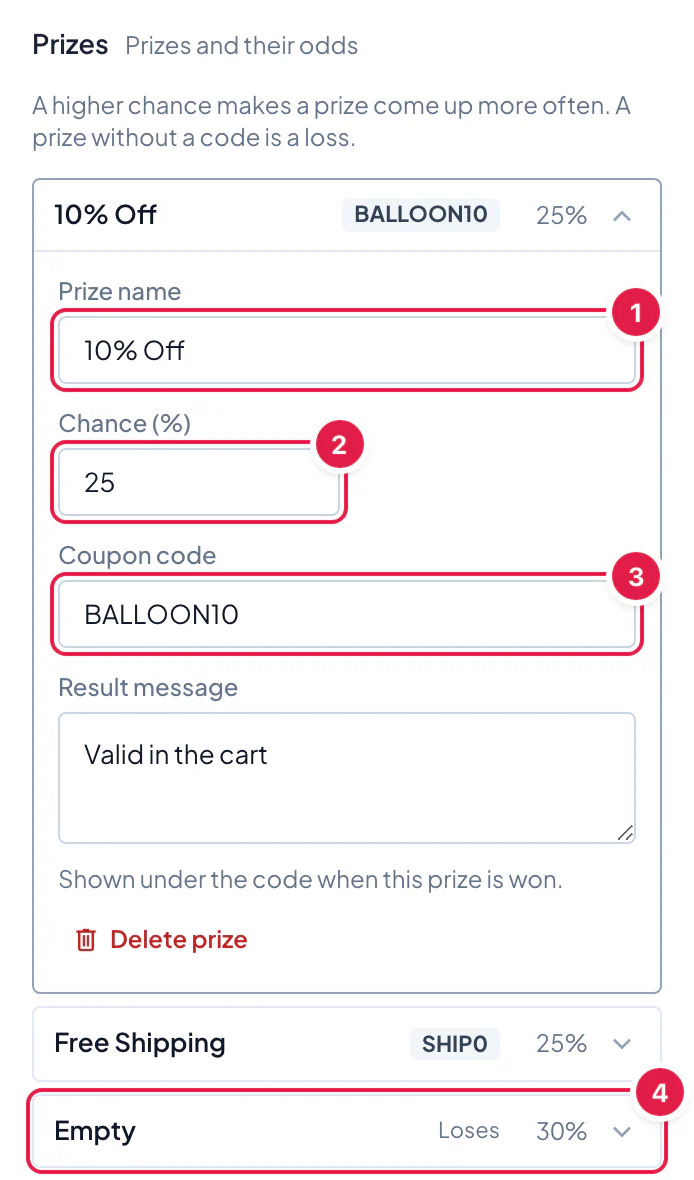
- Type the prize name.
- Type the prize's chance of coming out. A prize with a higher chance comes out more often.
- Type the coupon code the visitor gets.
- A prize with an empty coupon code is a loss.
- Set up the coupons in your storeCreate every code you wrote on the prizes in your store's coupon settings, spelled exactly the same.
- Set up the balloons and textsChoose the theme, the place on screen, the balloon arrangement and the number of balloons. Check the texts of the Balloons, When they win and When they lose screens in the preview.
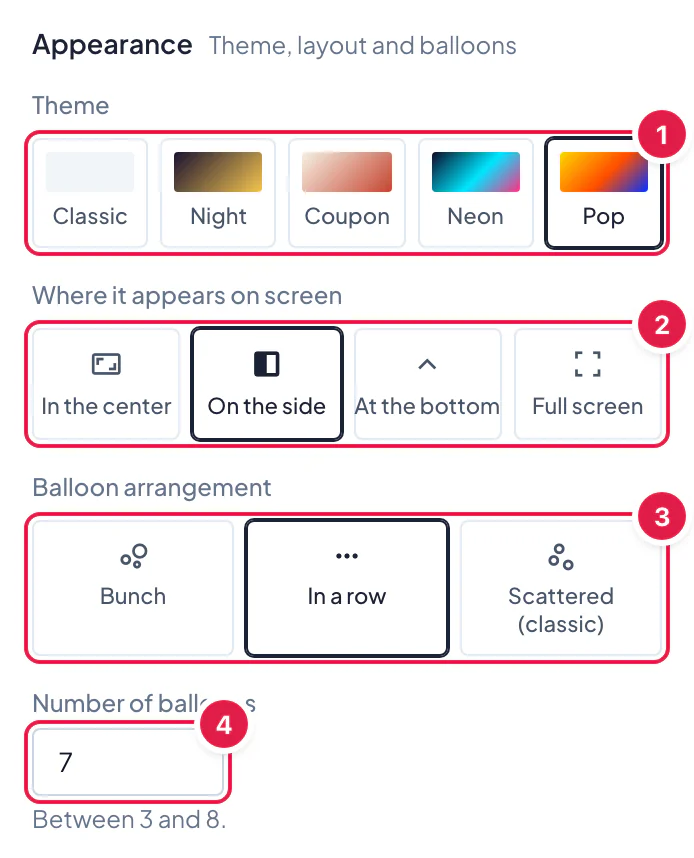
- Choose the theme.
- Choose where the balloons appear on screen.
- Choose how the balloons are arranged.
- Type the number of balloons, between 3 and 8.
- Choose when it opensIn the When it opens section, decide at what moment the balloons appear and how often the same person sees them.
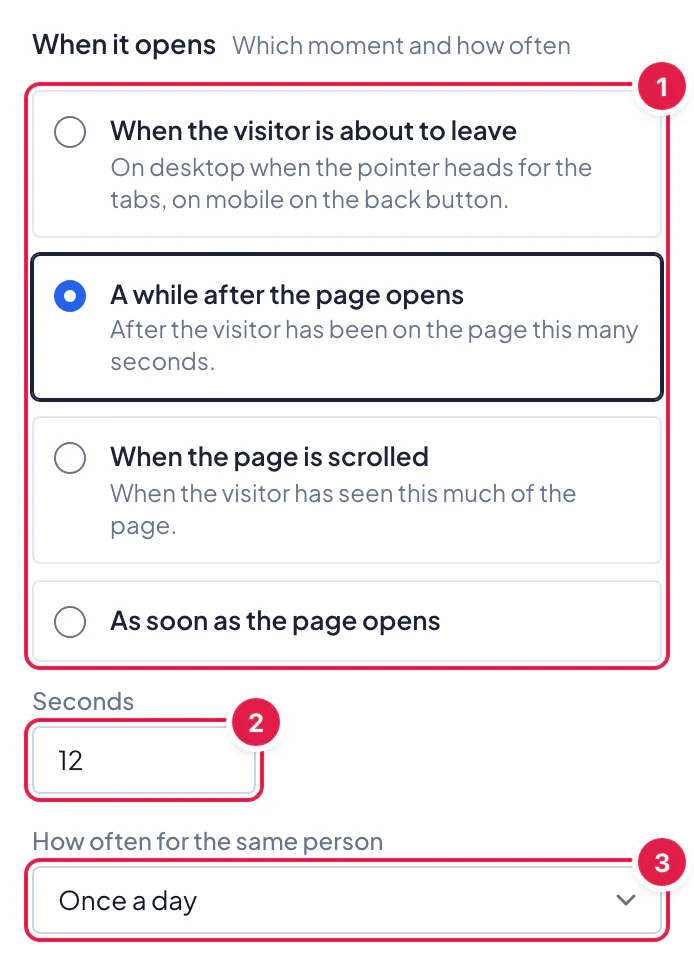
- Choose at what moment the balloons open.
- Type the time for the moment you chose. In the image, they open once the visitor has been on the page for 12 seconds.
- Choose how often the same person sees them.
- Go liveWhen you see "Ready to publish" in the Checklist section, save and turn the widget on.

- Switch it to "Active", then press the Save button at the top right. The widget starts showing in your store.
Settings#
| Setting | What it does |
|---|---|
| Appearance | Theme (Classic, Night, Coupon, Neon, Pop) and where the balloons appear on screen (in the center, on the side, at the bottom, full screen). |
| Balloon arrangement | Bunch, in a row or scattered (classic). |
| Number of balloons | How many balloons show on screen: between 3 and 8. |
| Texts | Title, subtitle and button text of the Balloons, When they win and When they lose screens. The "Ask for an email" switch is here too. |
| Prizes | For each prize: prize name, chance, coupon code and the result message shown under the code after a win. There must be at least 2 prizes. |
| When it opens | Opening moment: when the visitor is about to leave the site, a while after they arrive, when the page is scrolled down or as soon as the page opens. How often the same person sees it is chosen here too. |
| Who sees it | Page rules (show on this page, hide on this page) and audience rules (device, total visits, visitors with an email, segment and more). |
| Code timer | With "Put a time limit on the code" on, a countdown in minutes runs under the won code. |
Common situations#
Every balloon is a loss
If no prize has a coupon code, or the prizes with a code have a chance of 0, the balloons never win. The Checklist section shows this with a warning that no prize in these balloons can be won. Write a coupon code on at least one prize and give it a chance above 0.
A prize with a coupon code still loses
If the prize name contains "empty" or the letters "pas" (as in "pass"), the prize counts as a loss even with a coupon code. A few Turkish words for "empty", "try again" and "lose" count the same way. Give the winning prize a name without these words.
The visitor can't use the code in the cart
The widget only shows the code. Check that the same code is set up in your store's coupon settings, active and spelled the same way.
The balloons don't show again to the same person
The frequency setting in the When it opens section decides this. For your own tests you can use a private window. A visitor who wins a code with a time limit sees a small tab with the time left instead of the balloons until the time runs out.
Tips#
The chance values don't have to add up to 100. Each prize comes out as often as its share of the total. The number of balloons doesn't change the odds of winning.
If you write a coupon code on every prize, every balloon wins. Unless you mean to, add a prize with no code.
The code timer is only a countdown shown to the visitor. It doesn't make the code invalid in your store by itself. Set the coupon's real validity in your store's coupon settings.
Works well with
Spin to Win
All plansVisitors spin the wheel and get the coupon code of the slice they win. You can collect their email first.
Open guideGift Box
Pro and aboveVisitors open one of three gift boxes and get the coupon code of the prize inside. If you like, their email is collected first.
Open guideScratch Card
Pro and aboveVisitors scratch a card and get the coupon code of the prize underneath. An email can be collected first.
Open guide