- Check the statusThe campaign must be Active. Draft and Paused campaigns are not shown. An automatic ending rule may have paused the campaign by itself.
- Open the Checklist sectionIn the Checklist section on the campaign page, all three lines must be green: traffic shares add up to 100%, every variation has a design, the campaign is live.
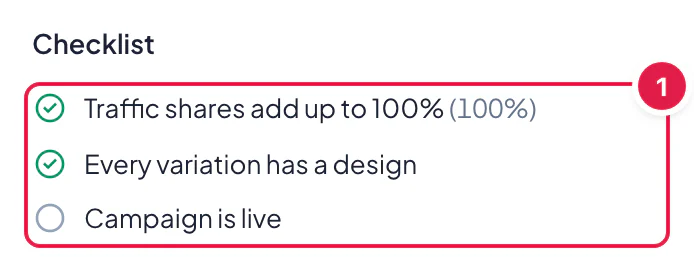
- All three lines should be green. The campaign in the image is still a draft, so the last line is empty.
- Test the page rulesType the address of the page you are looking at into Targeting Simulation and run it. If it says "Campaign WILL NOT BE SHOWN", the rule that stopped it is listed below.
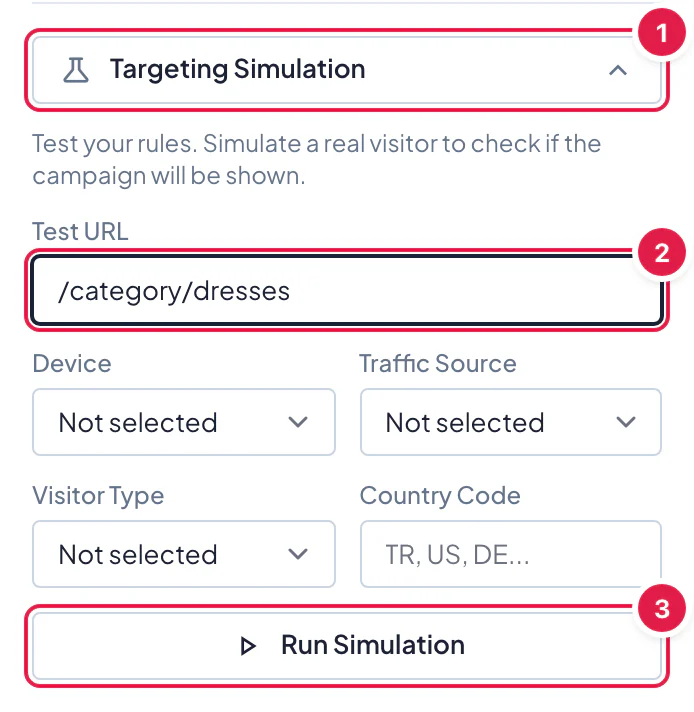
- Click the Targeting Simulation heading.
- Type the address of the page where you cannot see the campaign.
- Press Run Simulation.
- Check the other targeting choicesIf you chose a device, country, UTM or segment, the campaign shows only to visitors who match them. You may not be one of those visitors.
- Check the schedulingIf there is a day or hour rule in Smart Scheduling, the campaign is not shown outside that range.
- For a popup, think about frequencyIf you have seen the popup before, the frequency setting may be stopping it from opening again. Try a private window.
- Narrow it down with Try on your storeTry on your store shows the campaign regardless of its status, targeting and frequency. If it shows in the preview but not on a normal visit, the problem is in the settings above. If it does not show in the preview either, check the Commerce Up installation in your store and, for an inline banner, the selector.
| Warning | Meaning and fix |
|---|---|
| Not saved: Variation traffic shares must add up to 100% | The campaign is not saved until the shares add up to 100%. Fix the shares and save again. |
| Campaign Limit Reached | You have reached your plan's number of campaigns. Delete a campaign or upgrade your plan. |
| Variant Limit | You have reached your plan's number of variations per campaign. |
| These buttons have no target, so nothing happens when they are clicked | The listed buttons have no link address or target step. It does not stop the save. Select the button and set its target in the Actions section. |
| This template is available for premium plans | You chose a template or pack with a Pro badge. It needs the Pro plan or higher. |
| Custom CSS/JS is not part of your plan | Your design was saved, but the custom code you newly wrote was not. |
| Your session has expired, so your changes were not saved | Reload the page and sign in again. |
| The studio needs a larger screen | The design studio needs a width of at least 1024 pixels. |
| The studio could not start | The editor files could not load. Check your connection and reload the page. Your saved design is not affected. |
| This campaign has no variant to design | Add a variation on the campaign page and open the studio again. |
| Today's AI credits are used up | Credits renew the next day at 00:00. |
| Image is too large. Maximum 5MB allowed. | Make the image smaller and upload it again. |
| Only administrators can change these settings | You signed in with member access. Changes need an admin or the account owner. |
The popup opens but it is empty
The variation's design has not been saved, or a variation that gets traffic has not been designed. Check that every variation card says "Design ready".
The bar covers the top of my site's menu
A fixed bar sits on the edge of the screen and can overlap your theme's fixed menu. Set Display Behavior to Static or use a bottom bar.
A visitor closed the bar and it showed again on the next page
Bars have no frequency setting, so a closed bar is hidden only on that page. Use a popup for messages that should stay closed.
I made a change but the store still shows the old version
Make sure you pressed Save in the design studio, and Save on the campaign page for the settings, because they are saved separately. Then reload the store page.
The design overflows on a phone
There is one design, and on a narrow screen the window shrinks to the screen width. Check it with the Mobile button in the studio, and change elements with a fixed pixel width to a percentage width.
The variation name I changed on the campaign page is gone
The variation name and traffic share are saved with Save on the campaign page. If you left the page without saving, the change is lost.
Does Save on the campaign page delete the design I made in the studio
No. Only the design studio saves the design. The campaign page saves the name, shares and settings.
The Try on your store link does not work
The preview link works for about 30 minutes. Press the button again to get a new link. The address you type must start with http:// or https://.
Can I bring back a campaign I deleted
No. Deleting is permanent. Pause campaigns you may want to come back to instead of deleting them. Keep in mind that a paused campaign still counts toward the limit.
If you could not solve the problem, include this information when you write to the support team: the campaign's name, the full address of the page where you see the problem, the device and browser you use, the result Targeting Simulation gives for that address and whether the campaign shows in the "Try on your store" preview.
This information helps tell at first glance whether the problem is in the campaign settings or in the store theme.